

The part nobody drills
Most of us learn to produce a transcript. Fewer of us get to rehearse the pass that comes after: the careful second look where you decide what is actually right.
For a digital reporter that pass is the job. You listen again, check each word, fix who said what, and decide which edits to keep. Then you format and hand it over under your name.
It is also hard to practice. Real depositions are confidential, so you can’t share them. So we made a fictional one.
What the practice page is
There is a practice page at heydonna.law/cer-practice with a sample recording of a made-up deposition. The voices are synthetic AI voices, and the parties and facts are invented: Harlan Ridge Logistics, Inc. v. Peregrine Freight Systems, L.L.C.
You can play the sample without an account, and open its transcript to follow along. There is no timed assessment. It is self-paced.
Four habits to practice
1. Listen and check
Replay the audio and change the playback speed. Slow down on names, numbers and anything crosstalk-y. The goal is to catch what a fast first listen skips. The audio playback guide covers the controls.
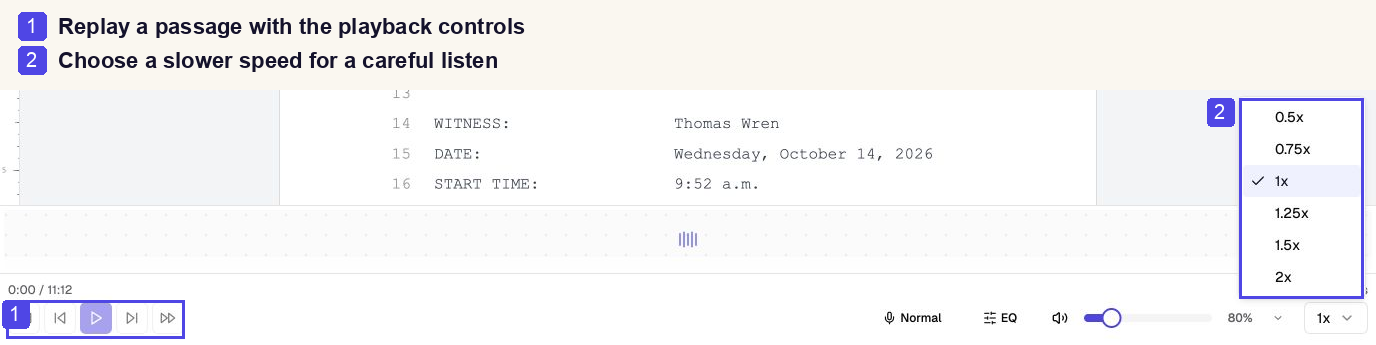
Listen and check: (1) replay controls, (2) playback speed; the waveform is still loading in this capture.
2. Identify speakers
Review the speaker labels and assign names in the speaker panel. A wrong label is easy to miss and costly to leave.
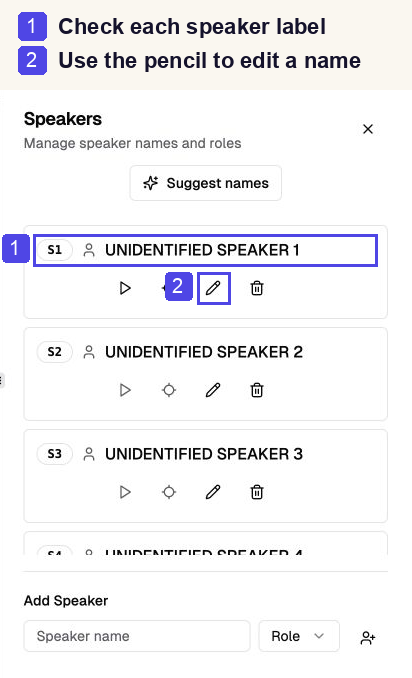
Identify speakers: (1) check the label, (2) use the pencil to edit the name.
3. Review suggestions
Run AI proofreading, then accept or reject each edit with Track Changes. This is the habit I care most about. A suggestion is a suggestion. You decide, because you are the one who certifies the transcript. See the guides to AI proofreading and Track Changes.
4. Format and export
Apply a legal template, review the formatting, and export a DOCX for a final read. Then read the final document the way someone else will. If you have not set up a template yet, here is how.
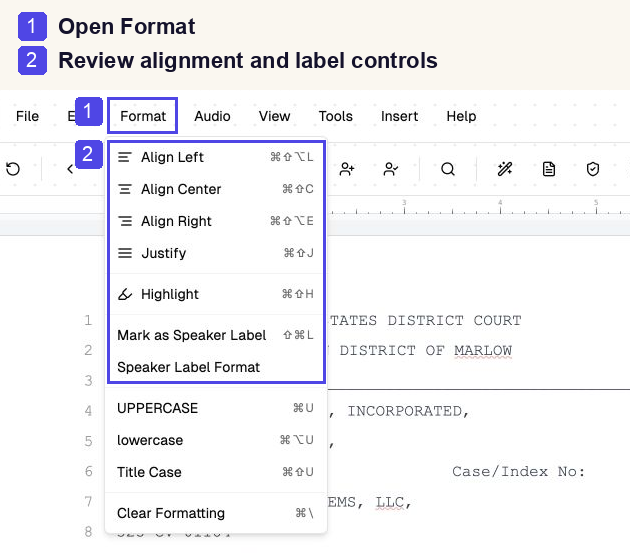
Format: (1) open Format, (2) review alignment and speaker-label controls; this is not template selection.
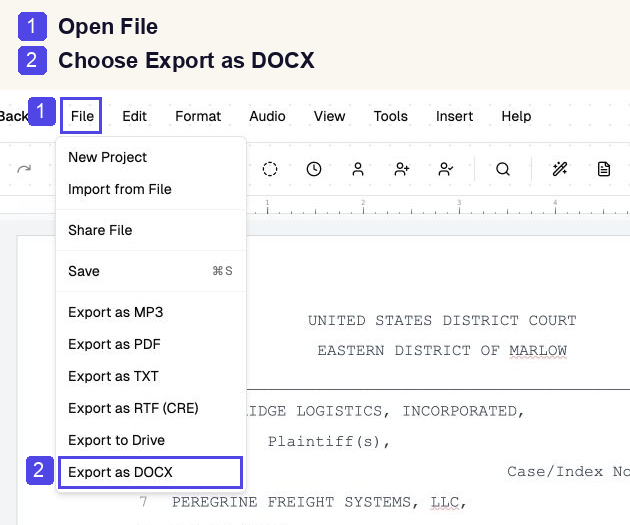
Export: (1) open File, (2) choose Export as DOCX, then check the downloaded document.
A note on the example
The page includes a before-and-after illustration of speaker-label and punctuation edits, using the fictional counsel introduction from the sample. It was prepared by hand. It is not an automated result, and it is not an answer key. Your edits may differ, and that is fine.
How to try it
- Play the sample on the page and open its transcript.
- Create a free account and a project with your own practice audio.
- Listen, edit, and review proofreading and formatting suggestions.
- Export your transcript and check the finished document against your requirements.
It is free to start. Signup includes credits. Processing and AI tools use credits, so further use may need a paid top-up. Current pricing is here.
If you are wondering where this fits next to the bigger picture, I wrote about why AI will not replace court reporters.
Tell me what is missing
If you would want a different kind of sample, such as another accent, more crosstalk or a different matter type, tell the team. Practice material should come from the people who do the work.