

I'm a reporter or transcriber.
Start from a formatted draft in your template, not a blank page. Pay as you go.
See the reporter pageFor court reporters, transcribers and agencies
I'll draft it. You make the call.
Upload the audio and job sheet. Donna drafts it in your format. You review every change, tracked, and export a court-ready DOCX.
2,500 free credits, then pay as you go. No subscription. AI is a supplement; the reporter certifies.
In one sentence
HeyDonna is an AI transcript editor for digital court reporters and legal transcriptionists. It drafts, proofreads and formats a transcript in your template, tracks every edit, and leaves the review and certification to you.
Who it is for
Start from a formatted draft in your template, not a blank page. Pay as you go.
See the reporter pageShare projects in a team workspace, and bring in Scribie staffing when you are stretched.
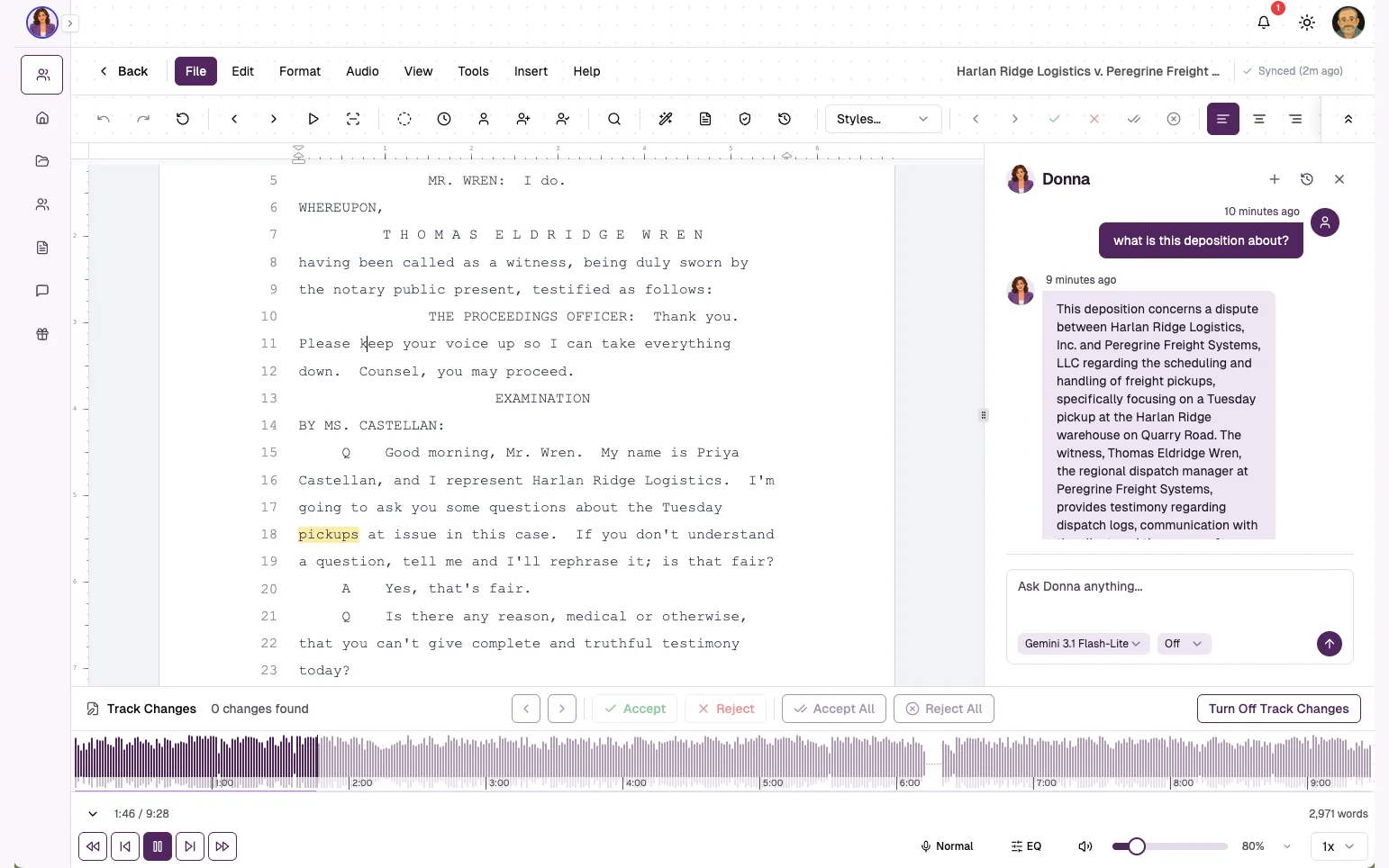
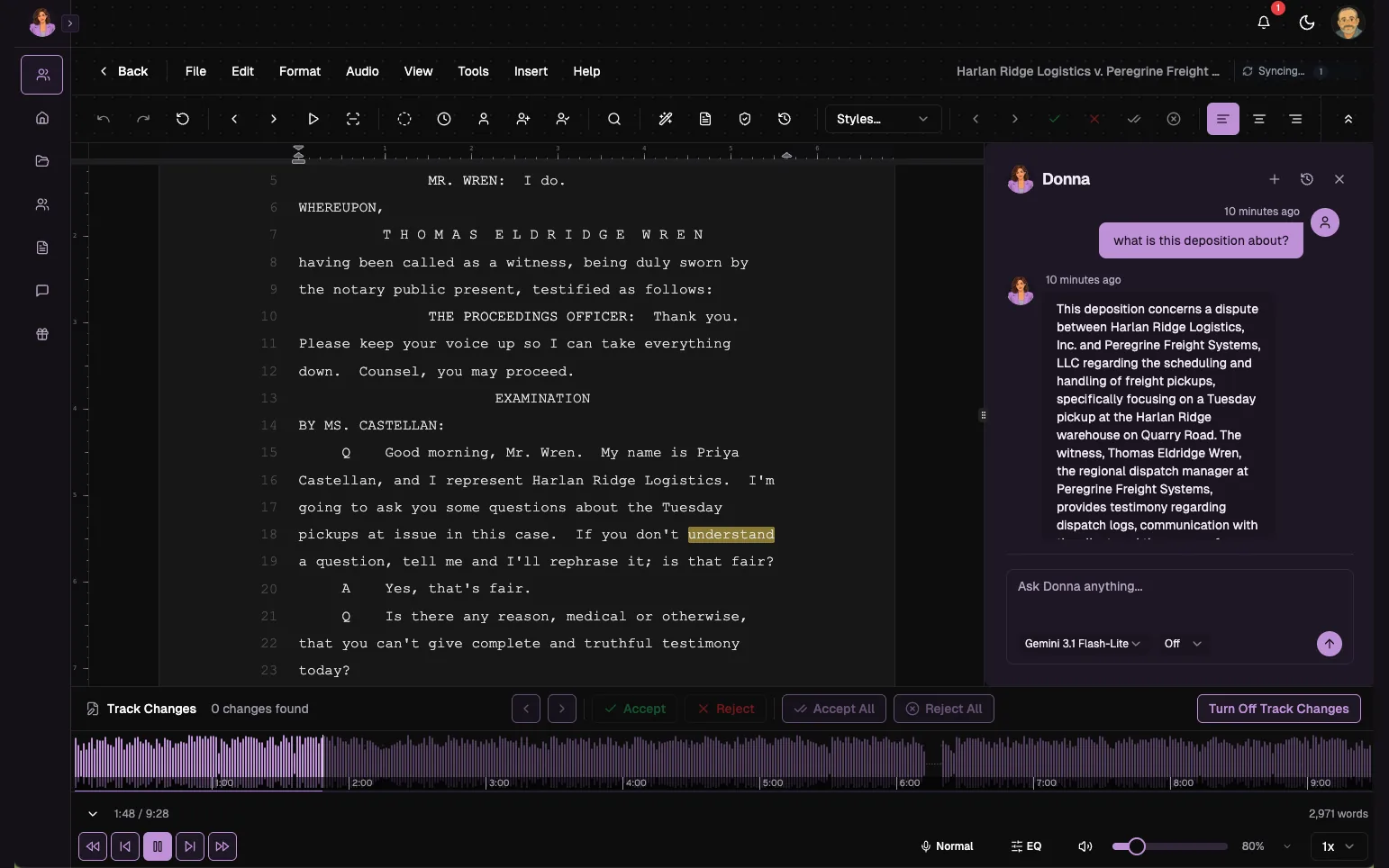
The editor stays calm. Donna only appears when you ask.
Why HeyDonna
Every edit is tracked and you accept or reject each one. Nothing is final until you accept it. Donna never signs off.
Your title pages, headers, footers, margins and line numbering stay as your template defines them. Export a DOCX you can certify.
Team workspaces with Owner and Member roles, plus an API and webhooks. Overflow staffing through Scribie is a service, arranged on a pilot call.
1 credit = $0.01. 2,500 free credits to start. No subscription.
Everything in one workspace
Powered by the latest models from Anthropic (Claude), OpenAI (GPT) and Google (Gemini), with you reviewing every change.
AI proofreads the draft against the audio. Every correction is a tracked edit you accept or reject.
AI applies Q/A structure, colloquy, and parentheticals, following your template.
Playback follows the text, so you can check any word against the recording.
Correct speaker labels and keep each turn legible.
Title pages, headers, footers, margins, and line numbering stay as your template defines them.
A polished legal transcript with the required structure intact.
How it works
Your title pages, appearances, headers, footers, margins and line numbering. Bring the template you already use and HeyDonna keeps it intact.


Bring the recording of the deposition. HeyDonna transcribes it and keeps playback synchronized with the text.


Bring the job sheet with the case details and speaker names. HeyDonna uses it to label speakers and fill your template.


You stay in control
Donna handles the repetitive production work so you can spend your time on accuracy and consistency.
Public beta pricing
1 credit = $0.01. Every new account starts with 2,500 free credits, then tops up only when needed.
2,500 free credits for every new account
About 4–5 hours of typical deposition audio, roughly 115–145 transcript pages.
Start free$5
500 credits
About 1 hour of typical deposition audio, roughly 25 pages
$25
2,500 credits
About 4–5 hours of typical deposition audio, roughly 115–145 pages
$100
10,000 credits
About 17–22 hours of typical deposition audio, roughly 460–585 pages
Estimates from typical deposition audio processed end-to-end (transcription, speaker labels, proofreading, formatting). Reusing an existing transcript uses fewer credits. Actual use varies with audio length and complexity.
About HeyDonna
Donna is built around the work between the recording and the delivered transcript, built so the reporter stays accountable for the record, the principle AAERT lays out in Preserving the Gold Standard in Court Reporting. HeyDonna is in public beta.
Why reporters need time back
21%
Fewer stenographers in the US over the last decade, leaving about 23,000.
74%
Drop in enrollment at stenography schools over the same period.
33%
Of US court reporters and simultaneous captioners are self-employed, among about 19,900 jobs in 2025.
AAERT is the association for digital reporters and commissioned its study, so read those figures as an advocate's. BLS projects no change in total jobs from 2025 to 2035. Fewer reporters and flat headcount mean more files per reporter, which is the problem HeyDonna is built for.
Data security
From the pilot
A lengthy four-hour file gets formatted in under 5 to 10 minutes, and the results are remarkably accurate. Once I export the DOCX, I barely need to make any additional edits before delivering it to the customer.
HeyDonna puts editing, formatting and proofreading all under one roof. I can proofread the transcript, format sections, swap speakers and run spellcheck without leaving the editor.
HeyDonna has enabled me to finish files much faster than I was able before, increasing my overall workflow. The auto-proofreading and auto-formatting processes have been the greatest help as HeyDonna gives a better and near accurate output than traditional ASR.
Starting with a transcript that is already formatted and proofread … cuts my turnaround time in half. HeyDonna allows me to spend less time editing and more time delivering quality work.
HeyDonna is an AI transcript editor for digital court reporters and legal transcriptionists. It drafts, proofreads and formats a transcript in your template, tracks every edit, and leaves the review and certification to you.
Digital court reporters and legal transcriptionists, and the agencies and teams that employ them, who want a formatted first draft to review instead of starting from a blank page.
No. You upload the recording and the job sheet. HeyDonna transcribes it, then proofreads and formats the draft in your template. Live capture stays with your recorder or CAT software.
HeyDonna is not CAT software. It exports DOCX, and RTF for court reporting (CAT) software, as the editor menu docs describe. Try an export on a real file before you rely on it; you start with 2,500 free credits.
Reject it. Every edit is tracked, and the final transcript contains only what you accept.
You make the judgment calls. Donna keeps suggestions visible so you can review, correct, and decide what belongs in the delivered transcript.
Playback and the working transcript stay together, making it easier to review words and speaker turns against the source recording.
You review and certify. Nothing is final until you accept it, and every edit stays visible.
Credits, no subscription. 1 credit = $0.01, and every new account starts with 2,500 free credits.
The 2,500 free credits cover about 4–5 hours of typical deposition audio, roughly 115–145 transcript pages. The $5 pack (500 credits) covers about 1 hour, roughly 25 pages, and the $100 pack (10,000 credits) about 17–22 hours, roughly 460–585 pages. These are estimates for new audio processed end-to-end; reusing an existing transcript uses fewer credits, and actual use varies with audio length and complexity.
Read how we handle your data on the Data security page.